Configuring Automated Record Destinations and Exception Alerts
An automated inbound line is only as reliable as where its data lands—here is how to configure primary record destinations, urgent exception alerts, and human oversight checkpoints without assuming zero-human operations.
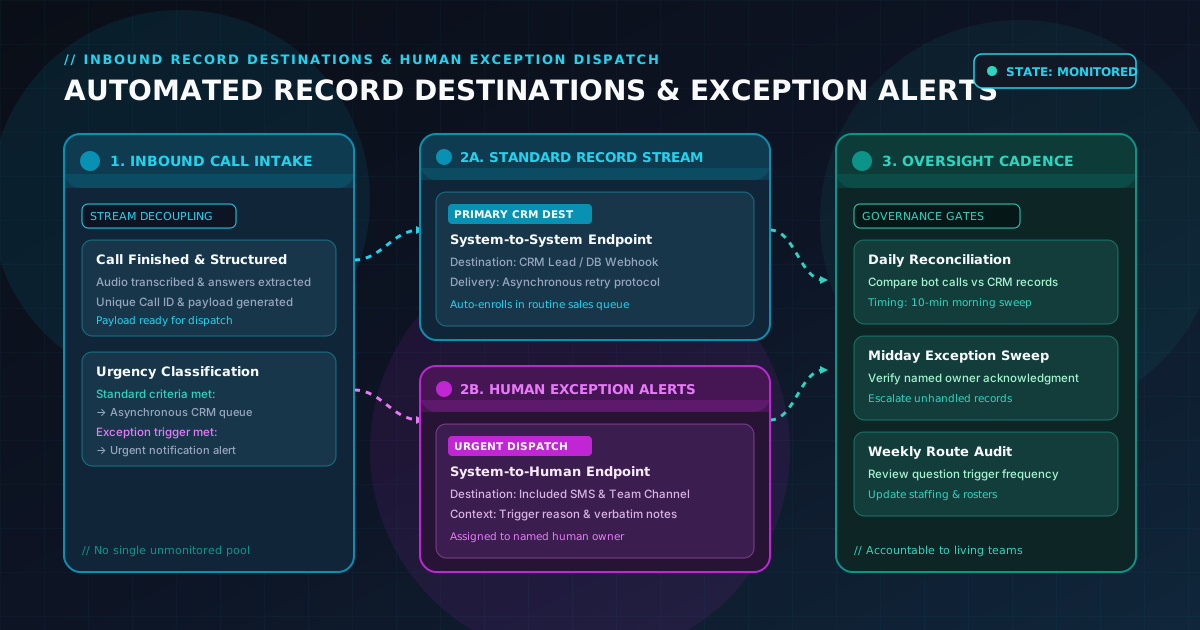
When a B2B operations team configures an inbound AI phone agent, attention naturally centers on the front end of the conversation: crafting qualification questions, tuning response phrasing, and mapping branching call logic.
However, capturing information on a phone call is only the first half of the automation workflow. The second half—and the one that ultimately determines whether the inbound line drives revenue or creates friction—is configuring where that data goes once the call ends.
If completed records are dumped into a shared email inbox, sales reps spend hours manually copy-pasting notes into internal databases. Worse, if an urgent caller requires immediate human assistance and that exception is routed to the exact same bulk storage queue as routine inquiries, high-value opportunities sit unnoticed for days.
A dependable automation architecture requires separating your intake data into two distinct operational streams:
- Standard Lead Records: Clean, completed intake payloads routed directly to your primary system of record (such as your CRM or operational database) for automated processing and routine follow-through.
- Human Exception Alerts: High-priority, context-rich notification events dispatched directly to designated team members when a caller falls outside standard automation boundaries or requires human intervention.
To build an automated intake system that teams can trust, an automation owner must answer four concrete configuration questions before turning on the line:
- How are standard records and human exception alerts decoupled across destination channels?
- What specific delivery behaviors, retry rules, and failure fallbacks govern payload transmission?
- Who monitors each destination stream, and what human oversight checkpoints exist to catch unhandled calls?
- How are endpoint configurations documented, tested, and reviewed over time?
Here is a practical guide for B2B automation owners on configuring automated record destinations, setting up human exception alerts, and establishing rigorous oversight checkpoints.
1. Decoupling the two destination streams: Standard records vs. exception alerts
The most frequent design mistake in inbound automation is treating all completed calls as a single data stream. Sending every call summary to a general Slack channel creates alert fatigue, causing team members to mute notifications. Conversely, sending every call exclusively to CRM custom objects ensures that urgent exception requests get buried beneath dozens of routine inquiries.
A well-structured automated line separates destinations by operational urgency and required human effort:
+---------------------------------------------------------------------------------+
|                       INBOUND DATA STREAM DECOUPLING MAP                        |
+---------------------------------------------------------------------------------+
|                                                                                 |
|   INBOUND CALL COMPLETED                                                        |
|             |                                                                   |
|             +---> STANDARD INTAKE (Bot resolved all criteria)                   |
|             |     |                                                             |
|             |     +--> Primary Destination: CRM / Core Database                 |
|             |     +--> Delivery Mechanism: Webhook / API Payload                |
|             |     +--> Timing Expectation: Asynchronous queue processing        |
|             |     +--> Action: Auto-creates lead record, triggers routine queue |
|             |                                                                   |
|             +---> HUMAN EXCEPTION (Ambiguity, custom need, caller requested rep)|
|                   |                                                             |
|                   +--> Primary Destination: Urgent Team Channel / SMS / Inbox   |
|                   +--> Secondary Destination: CRM Lead Record flagged "Exception"|
|                   +--> Timing Expectation: Direct alert to named human owner    |
|                   +--> Action: Immediate human callback & manual triage         |
|                                                                                 |
+---------------------------------------------------------------------------------+
Stream 1: Standard lead records (System-to-system)
When a caller meets all qualification criteria and provides standard, structured answers, the primary destination should be your system of record.
- Target endpoints: CRM leads table, customer database, or marketing automation queue via an endpoint webhook or platform integration.
- Payload content: Caller identity, verified contact details, explicit qualification answers, call timestamp, recording/transcript link, and automated next-step status (e.g.,
Follow-up Scheduled,Standard Prospect). - Operational goal: Clean system ingestion that allows marketing and sales workflows to trigger automatically without human data-entry overhead.
Stream 2: Human exception alerts (System-to-human)
When a call deviates from standard logic—such as an enterprise caller requesting custom contractual terms, a returning client reporting an emergency, or an inquiry with conflicting answers—the primary destination must be an active human communication channel.
- Target endpoints: High-visibility team notification queues (such as a dedicated triage channel in team messaging software), direct SMS alerts to an on-call manager (utilizing the platform's included SMS allowance), or a high-priority dispatch inbox.
- Payload content: A concise exception summary highlighting the exact trigger condition (e.g.,
Exception: Non-standard technical requirement stated), caller phone number, verbatim caller notes, and designated primary owner. - Operational goal: Immediate visibility that prompts a designated human representative to step in and follow up quickly.
2. Selecting destination channels across your operational stack
Configuring destinations requires aligning the technical capabilities of your downstream tools with your team's actual work habits.
+---------------------------------------------------------------------------------+
|                 DESTINATION CHANNELS & OPERATIONAL PURPOSES                     |
+---------------------------------------------------------------------------------+
|  CHANNEL TYPE          PRIMARY USE CASE           KEY CONFIGURATION REQUIREMENT |
|  --------------------  -------------------------  ----------------------------  |
|  CRM / Database        Standard lead records &    Field mapping, deduplication  |
|  (Webhook / API)       long-term record logging   keys, status tags             |
|                                                                                 |
|  SMS Text Alert        Urgent exceptions &        Designated mobile endpoints,  |
|  (Included allowance)  critical after-hours calls concise trigger summaries     |
|                                                                                 |
|  Team Messaging /      Shared operational triage  Named channel, explicit duty  |
|  Notification Webhook  & daytime exceptions       roster, response check        |
|                                                                                 |
|  Email Dispatch        Secondary notification &   Dedicated distribution list,  |
|  (Structured format)   audit archive              never an unmonitored mailbox  |
+---------------------------------------------------------------------------------+
CRM and database endpoints
Your CRM is the permanent repository for caller history. When configuring CRM endpoints:
- Enforce unique record keys: Ensure every incoming record carries a unique call identifier and normalized phone number to prevent duplicate lead creation during multi-call interactions.
- Map custom qualification fields: Do not dump all conversation data into an unstructured "Notes" field. Map specific qualification answers (such as budget range, team size, or timeline) to discrete custom fields so automated routing rules can segment the lead appropriately.
- Flag exception status clearly: Include a dedicated intake status field (e.g.,
Intake Status: Complete (Automated)vs.Intake Status: Human Exception Required) to allow queue filtering.
Urgent notification channels (SMS and messaging endpoints)
For exception alerts, choose channels where staff are already active:
- Targeted SMS alerts: Use your subscription's included SMS allowance to dispatch instant text alerts directly to an on-call lead or field supervisor when high-urgency exceptions occur. Keep the message body concise: caller name, phone number, and primary reason for escalation.
- Dedicated triage channels: If using team collaboration platforms, route exception webhooks into a dedicated channel (e.g.,
#inbound-exceptions) rather than a busy general chat. Establish clear operational guidelines for who is on duty to acknowledge incoming alerts.
Email dispatch as an operational fallback
While email is often slower than SMS or messaging webhooks, structured email dispatch serves as an invaluable backup:
- Use monitored distribution lists: Direct email summaries to a managed group alias (such as
inbound-triage@company.com) rather than a single individual who may be on leave. - Consistent subject lines: Configure predictable subject formatting (e.g.,
[EXCEPTION ALERT] Inbound Lead: Acme Corp - Custom Scope) so team members can create automated inbox filters and prioritization rules.
3. Establishing realistic delivery behaviors, retries, and fallbacks
Marketing claims in the automation space frequently promise "instantaneous, real-time lead sync." In enterprise software environments, treating data delivery as instantaneous is a dangerous operational assumption.
Networks experience latency, CRM endpoints run into API rate limits, third-party webhooks occasionally drop connections, and internal databases undergo scheduled maintenance. A resilient automated intake architecture must account for real-world delivery behaviors.
+---------------------------------------------------------------------------------+
|                       DELIVERY BEHAVIOR & RETRY PROTOCOL                        |
+---------------------------------------------------------------------------------+
|                                                                                 |
|  [Intake Record Generated]                                                      |
|           |                                                                     |
|           v                                                                     |
|  [Primary Delivery Attempt] ---> SUCCESS (HTTP 200/201) ---> [Logged & Done]    |
|           |                                                                     |
|           +---> FAILURE (Timeout / HTTP 429 Rate Limit / HTTP 500 Error)        |
|                   |                                                             |
|                   v                                                             |
|         [Automated Queue Retry] (Exponential backoff: 1 min, 5 min, 15 min)     |
|                   |                                                             |
|                   +---> Retry Succeeded ---> [Logged with Delay Stamp]          |
|                   |                                                             |
|                   +---> Exhausted All Retries (Persistent Outage)               |
|                           |                                                     |
|                           v                                                     |
|                 [Fallback Storage & Dead-Letter Alert]                          |
|                 - Record cached securely in platform log                        |
|                 - Backup email dispatch to Operations Lead                      |
|                 - High-priority system alert triggered                          |
|                                                                                 |
+---------------------------------------------------------------------------------+
Understanding delivery latency vs. instantaneous promises
Under normal operating conditions, an automated bot processes conversation audio, extracts structured field data, and transmits the payload to your configured webhook within seconds of call completion.
However, teams should never build operational workflows that assume zero latency. Configure downstream systems to expect asynchronous delivery and allow a buffer window for webhooks to execute, queue, and validate before triggering automated follow-up sequences.
Configured retry mechanisms
If your CRM or internal server temporarily rejects an incoming webhook (due to server throttling, network timeouts, or schema validation errors), the automation platform must not discard the data.
- Exponential retry logic: Standard delivery protocols attempt multiple retries over spaced intervals (e.g., immediate retry, followed by attempts at 1, 5, and 15 minutes).
- Idempotency handling: Downstream receiving endpoints must be configured to handle retried payloads gracefully. By checking the unique call ID, your database can update an existing record rather than creating duplicate contacts if a network timeout caused a false failure acknowledgment.
Dead-letter fallbacks and delivery failure logging
What happens if your primary CRM undergoes an extended multi-hour outage?
- Platform logging backup: All call summaries, audio records, and extracted data remain accessible within the platform's central activity log regardless of third-party endpoint availability.
- Secondary notification fallback: When a primary webhook fails repeatedly, the system should trigger a secondary fallback notification (such as an automated email dispatch to the technical operations owner) warning that external record synchronization has stalled.
4. Human oversight checkpoints: Governance without zero-staffing myths
Positioning an inbound AI phone agent as a "zero-staffing, 100% autonomous machine" is a recipe for operational failure. The purpose of automation is to eliminate repetitive manual intake tasks—answering phones 24/7, capturing structured answers, and delivering records—so human staff can focus on high-value conversations.
Automation does not replace human oversight; it demands clear human checkpoints.
An automation owner must institute three recurring governance checkpoints:
+---------------------------------------------------------------------------------+
|                       RECURRING HUMAN OVERSIGHT CADENCE                         |
+---------------------------------------------------------------------------------+
|                                                                                 |
|  [ DAILY MORNING RECONCILIATION ] (10-15 Minutes)                               |
|  - Compare total calls answered by bot vs. records received in CRM              |
|  - Verify zero failed webhook deliveries in platform log                        |
|  - Check for records stranded in "Unassigned" status                            |
|                                                                                 |
|  [ MIDDAY EXCEPTION SWEEP ] (10 Minutes)                                        |
|  - Review all human exception alerts dispatched in the previous 24 hours        |
|  - Confirm each exception alert was acknowledged by its primary owner           |
|  - Escalate unresolved exceptions to the designated fallback manager            |
|                                                                                 |
|  [ WEEKLY DESTINATION & ROUTE AUDIT ] (30 Minutes)                              |
|  - Review recurring exception trigger patterns                                  |
|  - Audit payload field completeness with frontline sales reps                   |
|  - Update team notification endpoints, staff phone numbers, and on-call rosters |
|                                                                                 |
+---------------------------------------------------------------------------------+
Checkpoint 1: Daily record reconciliation sweep
Every morning, an operations coordinator or intake lead spends ten minutes reconciling platform activity against downstream endpoints:
- Verify that the count of completed calls in the bot console matches the count of newly created CRM records.
- Inspect delivery status logs to confirm that all outbound webhooks completed successfully without persistent retry errors.
- Identify any records where contact details were incomplete or malformed.
Checkpoint 2: Daily exception ownership audit
Exceptions require active human follow-up. A daily audit ensures that no caller gets lost between automated intake and human contact:
- Open the central exception alert log or dedicated team channel.
- Confirm that every exception generated in the preceding 24 hours has a recorded timestamp, an assigned human owner, and an updated status (e.g.,
Contacted,Meeting Booked,Disqualified). - If an exception remains untouched past your team's internal follow-up window, escalate the record directly to the secondary fallback owner.
Checkpoint 3: Weekly route and payload review
Once a week, the automation owner meets briefly with sales and operations stakeholders:
- Review exception categories: Are certain qualification questions generating an unusually high number of exceptions? If so, the question prompt may need re-wording or qualification thresholds may need adjustment in the platform.
- Validate field accuracy: Confirm that the data points captured by the bot are genuinely useful to the receiving reps.
- Maintain endpoint rosters: Ensure that employee phone numbers for SMS alerts and email distribution aliases reflect current staffing and on-call schedules.
5. Blank illustrative automated destination configuration worksheet
Before activating an automated intake line, operations teams should complete a destination configuration worksheet. This document maps every call outcome to its target endpoint, delivery behavior, and human owner.
Use the following blank planning worksheet to map your team's configuration:
===================================================================================
         AUTOMATED RECORD DESTINATION & EXCEPTION ALERT CONFIGURATION WORKSHEET
===================================================================================

SECTION 1: SYSTEM & WORKSPACE IDENTIFIERS
Organization / Business Name: ____________________________________________________
Inbound Phone Line / Agent ID: ___________________________________________________
Workspace Administrator: _________________________________________________________
Technical Operations Lead: _______________________________________________________
Date of Configuration: ___________________________________________________________

-----------------------------------------------------------------------------------
SECTION 2: PRIMARY RECORD DESTINATIONS (STANDARD INTAKE STREAM)
-----------------------------------------------------------------------------------
Primary System of Record (CRM / DB): _____________________________________________
Endpoint URL / Webhook Target: ___________________________________________________
Authentication / API Method: _____________________________________________________
Default Record Object Type (e.g., Lead, Deal): ___________________________________
Unique Record Deduplication Key: _________________________________________________
Required Intake Data Fields to Map:
  [ ] Caller Full Name                [ ] Caller Stated Budget / Scale
  [ ] Verified Phone Number           [ ] Stated Timeline / Urgency
  [ ] Verified Email Address          [ ] Intake Call Timestamp
  [ ] Primary Inquiry Reason          [ ] Unique Call ID / Audio Link
Delivery Behavior Protocol:
  - Standard Delivery Mode: [ ] Asynchronous Webhook  [ ] Direct API  [ ] Email
  - Timeout Threshold: _______ seconds
  - Retry Protocol: [ ] Exponential backoff (1m, 5m, 15m)  [ ] Manual resend only
  - Dead-Letter Fallback Email: __________________________________________________

-----------------------------------------------------------------------------------
SECTION 3: HUMAN EXCEPTION ALERT DESTINATIONS (URGENT ALERT STREAM)
-----------------------------------------------------------------------------------
Exception Condition 1: Commercial Scale / Custom Terms Request
  - Alert Endpoint: [ ] SMS Alert  [ ] Messaging Channel  [ ] Priority Email
  - Target Channel / Phone / Inbox: ______________________________________________
  - Primary Human Owner (Role/Name): _____________________________________________
  - Secondary Fallback Owner: ____________________________________________________
  - Required Context in Alert: ___________________________________________________

Exception Condition 2: Ambiguous Need / Conflicting Answers
  - Alert Endpoint: [ ] SMS Alert  [ ] Messaging Channel  [ ] Priority Email
  - Target Channel / Phone / Inbox: ______________________________________________
  - Primary Human Owner (Role/Name): _____________________________________________
  - Secondary Fallback Owner: ____________________________________________________
  - Required Context in Alert: ___________________________________________________

Exception Condition 3: Caller Explicitly Requests Human Specialist
  - Alert Endpoint: [ ] SMS Alert  [ ] Messaging Channel  [ ] Priority Email
  - Target Channel / Phone / Inbox: ______________________________________________
  - Primary Human Owner (Role/Name): _____________________________________________
  - Secondary Fallback Owner: ____________________________________________________
  - Required Context in Alert: ___________________________________________________

-----------------------------------------------------------------------------------
SECTION 4: HUMAN OVERSIGHT & GOVERNANCE CADENCE
-----------------------------------------------------------------------------------
Daily Record Reconciliation Owner: _______________________________________________
Daily Exception Sweep Owner: _____________________________________________________
Reconciliation Check Time: [ ] 08:30 AM  [ ] 09:00 AM  [ ] Other: ______________
Weekly Route & Payload Review Schedule: Every ______________ at __________________
Review Stakeholders (Operations, Sales, Support): ________________________________

Operational Approvals:
Automation Owner Sign-off: _______________________________ Date: _________________
Frontline Sales / Operations Lead Sign-off: ______________ Date: _________________
===================================================================================
Note: This blank worksheet is an illustrative operational planning tool for internal team governance; it does not represent an active software integration dashboard, a real-time delivery guarantee, or automated follow-through without human involvement.
6. An illustrative scenario: Configuring multi-channel record delivery
To see how destination configuration operates in practice, consider the following operational scenario:
Illustrative Example
Apex Fleet Logistics is a regional commercial vehicle leasing and maintenance provider operating across three metropolitan distribution hubs. They deployed an inbound AI phone agent to handle after-hours inquiries, qualify prospective fleet managers, and capture emergency repair requests.
During their initial deployment, the operations team directed all call outputs to a single shared email inbox:
leads@apexfleet.example.com.Within three days, operational friction surfaced:
- Routine leasing inquiries sat unentered in the inbox while sales reps were on customer calls.
- A commercial fleet director needing five heavy tractor units called after hours; their record sat in the inbox for 18 hours before a representative opened it.
- An emergency maintenance caller needing urgent roadside assistance left their details, but the email went unread until 8:00 AM the following morning.
The operations lead convened a destination planning session using the configuration worksheet:
- Separating the Streams:
- Standard Fleet Leasing Inquiries: Routed via webhook directly into Apex's CRM. The system mapped company fleet size, vehicle type, and target lease start date directly to CRM custom fields, automatically assigning the lead to the commercial leasing round-robin queue.
- Commercial Scale Exceptions: Callers leasing more than 15 vehicles were flagged as high-priority commercial exceptions. The bot triggered an SMS alert directly to the Commercial Sales Director's mobile phone using the platform's included SMS allowance, delivering the caller's fleet requirements and callback number within moments of call completion.
- Emergency Maintenance Exceptions: Callers reporting an active vehicle breakdown were routed to an urgent messaging channel (
#emergency-dispatch) with a secondary fallback email dispatched to the on-call shop foreman.- Establishing Delivery & Oversight Protocols:
- Delivery Resilience: Apex configured exponential webhook retries on their CRM endpoint, with an automated fallback notification to the IT coordinator if the endpoint experienced connection timeouts.
- Daily Checkpoint: The Intake Coordinator was assigned a 15-minute daily morning checkpoint to verify that all CRM records synced cleanly and confirm that every SMS exception alert had been claimed by a sales representative.
- Operational Outcome:
- Standard inquiries flowed directly into sales queues without manual data entry.
- High-value enterprise leads received prompt personal outreach from senior leadership.
- Zero emergency requests were stranded in unmonitored general inboxes.
This scenario is an illustrative operational example designed to demonstrate record destination configuration and exception alerting; it does not represent an actual customer endorsement, proprietary integration, or verified commercial performance outcome.
7. How Your Lead Data Bot supports automated intake and record delivery
At Your Lead Data Bot, our premise is built around an automation-forward inbound AI phone agent: an always-on bot that answers incoming calls, qualifies callers against your agreed criteria, and delivers structured lead records into your downstream tools—while maintaining an explicit, reviewable exception model for calls that need people.
We believe automation succeeds when it connects directly to your existing operational workflows. An automated inbound line should free your team from answering repetitive screening calls, while ensuring that high-intent callers and complex exceptions reach the right human owners promptly.
Sales-assisted initial setup with in-platform customer control
Setting up your automated intake path and configuring your downstream destinations is designed to be straightforward:
- Sales-assisted initial setup: A sales agent works directly with your team to establish your initial call flow, draft your qualification questions, define your lead record structure, and map your destination endpoints and exception notification rules.
- In-platform adjustments: As your business evolves, your team can adjust qualification questions, modify thresholds, update destination webhooks, and change notification phone numbers directly within the platform, with customer support available for additional assistance.
Transparent, predictable commercial terms
We provide transparent, month-to-month subscription terms designed for growing B2B teams:
- Standard subscription: The standard AI Phone Agent subscription is $199 per month, billed month to month.
- Zero upfront fees: There is no setup or onboarding fee ($0).
- Included monthly allowances: Each monthly billing period includes 500 inbound voice minutes and 500 SMS text messages.
- Affordable metered overages: Usage beyond monthly allowances is billed at $0.12 per additional minute and $0.02 per additional SMS.
- Month-to-month flexibility: Cancel before your current billing period ends to prevent renewal for the next cycle. Phone service remains available through the paid period; overage charges already incurred remain due. Refunds for prepaid monthly phone service are considered case by case.
Build an automated intake flow your team can rely on
Do not let your automated phone data disappear into an unmonitored queue. Pair your automated call flow with clean record destinations, targeted exception alerts, and clear human checkpoints.
- Ready to map your automated call destinations? Talk through your automated intake path with our team or start phone service directly.
- Learn about our workflow: Read How Your Lead Data Bot Works and check our FAQ.
- Refine your lead records: Review What an automated lead record should carry forward and Where an automated inbound flow needs a human exception.
- Explore exception management: Read An automated lead-intake checklist for human exceptions and Review human exception ownership after changing an automated intake path.
- Understand automated line capabilities: Read What a hands-off inbound line can do.
- Review our terms: Read the complete Your Lead Data Bot Terms of Service.