Review Human Exception Ownership After Changing an Automated Path
When you update an automated intake path, you change the workload for the person in the loop—here is how to audit which new exceptions are created, who owns them, and what context they need to resolve them.
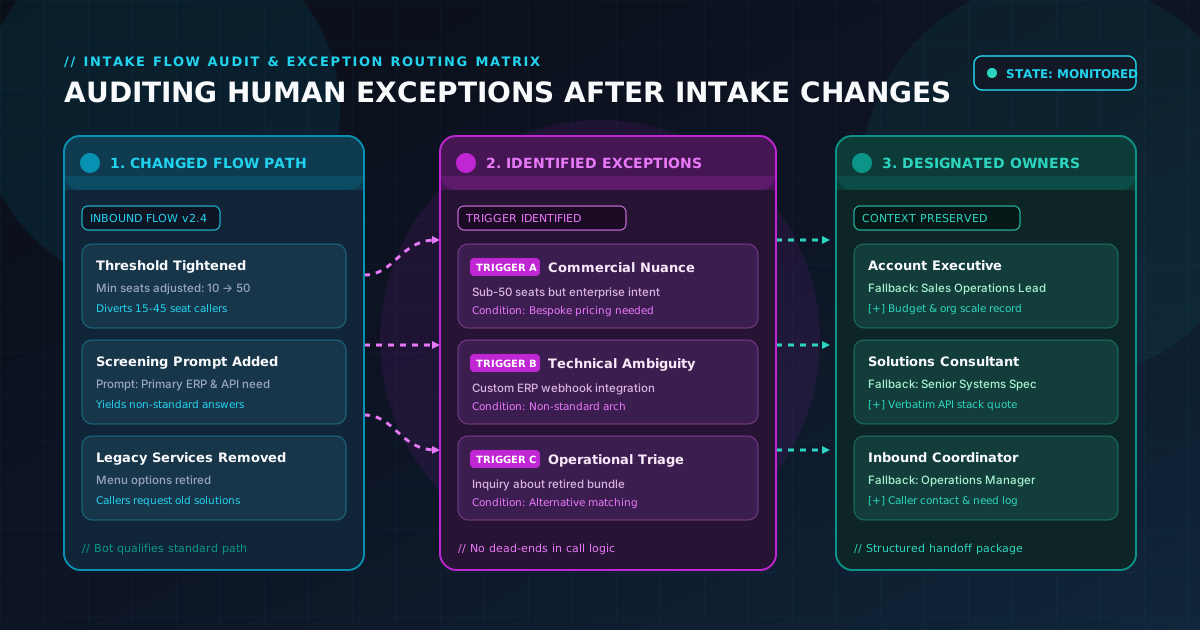
When a B2B operations team updates an automated phone intake path, it is easy to view the update solely as a platform configuration. Perhaps you adjusted a qualification question, added an industry screening parameter, or refined how the inbound AI phone agent classifies caller requests. In the configuration console, the change appears clean: a new question prompt, a few revised branch options, and an updated routing rule.
However, an automated intake path never operates in a vacuum. Every time you alter an automated question or tighten a qualification criterion, you alter the boundary between automated handling and human judgment.
A question that previously resolved cleanly into a standard automated next action may now create unexpected edge cases. If no one explicitly audits that boundary after the change, those new exceptions do not disappear—they simply accumulate in unmonitored queues, land on the wrong team members, or force callers to repeat information they already gave to the bot.
An automated path is only as dependable as its human exception model. When you change an automated flow, conducting a post-change review requires answering three concrete operational questions:
- Which changed question creates a new human exception?
- Who specifically receives that exception and owns the next step?
- What structured context does that person need to resolve the conversation?
Here is how B2B automation owners and operations leads can audit exception ownership after changing an automated intake path.
1. Identify which changed question creates a new exception
Automated inbound agents excel at executing predictable, repeatable conversation paths. When a caller's answers match approved criteria, the flow smoothly moves forward to the configured outcome—whether logging structured lead details, providing standard information, or scheduling a consultation.
When you modify an automated path, the potential for new human exceptions arises from four common change patterns:
+---------------------------------------------------------------------------------+
|                      INTAKE FLOW CHANGE AUDIT TAXONOMY                          |
+---------------------------------------------------------------------------------+
|  NARROWED CRITERIA                  NEW SCREENING QUESTIONS                     |
|  - Higher budget/size minimums      - Added technical environment questions     |
|  - Stricter timeline filters        - Specific compliance/licensing queries     |
|  -> Diverts previously standard     -> Creates nuanced responses that standard  |
|     callers into exception pool        branches cannot parse                    |
|                                                                                 |
|  REVISED OPTION LISTS               MODIFIED INTAKE SEQUENCING                  |
|  - Grouped product categories       - Qualification before general inquiry      |
|  - Removed legacy service options   - Reordered discovery prompts               |
|  -> Leaves callers with blended     -> Causes callers with multiple needs to    |
|     needs without a clear branch       deviate earlier in the call              |
+---------------------------------------------------------------------------------+
Narrowing qualification thresholds
If your updated path increases the qualification threshold—for example, shifting your minimum user threshold from 10 seats to 50 seats—callers with 15 to 45 seats will no longer follow the standard automated sales route.
- The exception question: What happens to callers who fall below the new threshold but still represent viable commercial opportunities?
- The audit task: If they are not rejected outright, they become an exception. Identify whether the threshold shift creates a secondary routing branch that requires human review.
Introducing nuanced or open-ended screening questions
Replacing a simple multiple-choice question (such as "Are you looking for software or implementation services?") with a technical question (such as "What ERP system does your team currently run?") inevitably introduces responses that do not fit predefined branches. Callers may cite legacy systems, custom in-house tools, or multi-platform setups.
- The exception question: When a caller provides an unexpected answer, does the bot attempt an awkward classification, or does it cleanly route the call as a human exception?
- The audit task: Pinpoint the exact question prompt where ambiguity can arise, and designate that non-standard responses trigger an intentional exception handoff.
Removing legacy options from standard menus
When products or service lines are discontinued, teams often delete those options from the intake agent's standard paths. Yet prospective and returning callers will continue to ask for them.
- The exception question: How does the bot handle inquiries about retired offerings?
- The audit task: Instead of letting the conversation stall, map retired service inquiries directly to an exception route so an experienced team member can explain alternative solutions.
2. Assign explicit ownership: Who receives the exception?
The most common failure in exception management is assigning exceptions to a "shared mailbox" or an ambiguous team pool. When everyone is responsible for an unassigned exception queue, no single person takes accountability, response times stretch, and high-intent leads go cold.
When an intake change creates a new exception type, the automation owner must pair that exception with a named role and a defined fallback owner.
+---------------------------------------------------------------------------------+
|                       EXCEPTION ROUTING & OWNERSHIP MATRIX                      |
+---------------------------------------------------------------------------------+
|                                                                                 |
|  [Inbound Exception Trigger]                                                    |
|            |                                                                    |
|            +---> [Commercial Nuance] --------> Account Executive / Sales Lead   |
|            |     (Custom scope, high budget)    (Fallback: Sales Operations)    |
|            |                                                                    |
|            +---> [Technical Ambiguity] ------> Solutions Consultant / Systems   |
|            |     (Non-standard architecture)    (Fallback: Senior Support)      |
|            |                                                                    |
|            +---> [Operational Triage] -------> Intake Lead / Coordinator        |
|                  (Unclear intent, mixed need)   (Fallback: Operations Manager)  |
|                                                                                 |
+---------------------------------------------------------------------------------+
Match exception complexity to the right skill set
Not all exceptions are created equal. Different questions require different human competencies:
- Commercial exceptions: A caller who meets company size criteria but requests custom contract terms or bespoke pricing should route to a senior Account Executive or Sales Manager who has commercial discretion.
- Technical fit exceptions: A caller whose technical stack falls outside standard integrations should route to a Solutions Consultant or Technical Lead who can evaluate compatibility.
- Triage exceptions: A caller whose objective remains unclear or who gave conflicting answers during intake should route to an Inbound Coordinator for quick clarification before further distribution.
Establish a primary receiver and an operational fallback
Every designated exception route needs two roles:
- The Primary Owner: The specific role responsible for reviewing the incoming exception record and initiating the next action.
- The Fallback Owner: The backup role that receives an alert if the primary owner is on leave, out of office, or unable to act within the team's operational window.
Operational note: Automated intake configurations route information and trigger notifications according to business rules; they do not replace human responsiveness or guarantee real-time human availability. Defining clear internal ownership ensures that once an exception is captured, your team knows exactly who steps in.
3. Define the context package: What does the human need?
Nothing degrades a caller's experience faster than being handed off to a human representative who asks, "So, tell me from the beginning—why are you calling today?"
When an exception occurs, the automated agent has already engaged the caller, verified their contact information, and asked several structured questions. Forcing the caller to repeat those details makes the automated intake feel like an obstacle rather than an efficient front door.
A complete human exception package must deliver four distinct layers of context:
+---------------------------------------------------------------------------------+
|                         HUMAN EXCEPTION CONTEXT PACKAGE                         |
+---------------------------------------------------------------------------------+
|  1. EXCEPTION TRIGGER REASON                                                    |
|     - Exact question where standard flow diverted                               |
|     - Specific condition (e.g., non-standard ERP, custom compliance query)      |
|                                                                                 |
|  2. ESTABLISHED CALLER CONTEXT                                                  |
|     - Caller name, verified callback number, business email                     |
|     - Organization name, estimated employee count, geographic region            |
|                                                                                 |
|  3. VERBATIM CALLER RESPONSES                                                   |
|     - Direct transcript snippet or structured summary of ambiguous answer       |
|     - Stated operational challenges or specific requirements mentioned          |
|                                                                                 |
|  4. RECORD STATUS & RECOMMENDED NEXT ACTION                                     |
|     - Exception status: Pending Human Review                                    |
|     - Suggested next step: Technical qualification callback / Custom scoping    |
+---------------------------------------------------------------------------------+- The exact exception trigger: The human owner must immediately see why this call diverted from the standard path (e.g., "Trigger: Question 3 - Caller requested non-standard HIPAA compliance addendum").
- The confirmed baseline data: All standard data points collected prior to the diversion (caller name, company name, callback number, current scale) must be organized clearly in the record.
- The verbatim caller input: The exact response or keyword that prompted the exception branch should be preserved so the human representative understands the caller's specific phrasing.
- Current record status: The record should clearly indicate that the interaction is an active exception requiring human follow-through, preventing it from being mistaken for a completed standard intake.
4. An illustrative change-review grid
To ensure thorough governance whenever an automated intake path is modified, operations teams should complete a structured change-review grid before deploying updates.
The following blank grid provides an illustrative operational template for mapping flow changes to human exception owners:
Automated intake path change-review grid
| Grid Dimension | Review Specification |
|---|---|
| Intake Flow Identifier & Version | [Flow name, version number, modification date, change author] |
| Specific Question or Rule Changed | [Exact prompt or logic condition modified in the intake sequence] |
| Previous Automated Behavior | [How the system previously classified and routed this interaction] |
| Revised Automated Behavior | [How the updated path now processes standard responses] |
| New Exception Scenario Created | [Specific caller scenarios or answers that now divert from standard path] |
| Designated Primary Human Owner | [Specific role or individual responsible for receiving this exception] |
| Designated Fallback Owner | [Backup role responsible if primary owner is unavailable] |
| Required Context Fields in Record | [List of data fields, trigger reason, and verbatim notes required] |
| Handoff Notification Destination | [Configured record destination, webhook, or notification queue] |
| Sign-Off & Operational Approval | [Operations Lead and Department Head approval dates] |
Note: This blank grid is an illustrative operational planning tool for internal team governance; it does not represent an active automated monitoring engine, a real-time record delivery guarantee, or automated follow-through without human involvement.
By documenting every modified prompt in this grid, automation owners ensure that no change goes live without an agreed-upon human receiver and an adequate context package.
5. An illustrative scenario: Auditing an intake change
To illustrate how this post-change review operates in practice, consider the following operational scenario:
Illustrative Example
MetricFlow Analytics is a B2B SaaS company providing revenue intelligence tools to mid-market software companies. They deployed an inbound AI phone agent to answer inbound calls, qualify prospect scale, and book discovery calls for standard accounts.
Originally, the intake agent asked: "How many sales representatives currently use your CRM platform?" Any caller with 10 or more representatives followed an automated booking path.
To improve discovery efficiency, the operations team updated the flow to add a second qualification question: "What is your primary CRM platform, and do you require custom API integration?"
Within forty-eight hours of launching the updated flow, the team noticed a breakdown: callers requesting custom API integrations were dropping off the line, and several high-intent enterprise accounts were stranded in an unassigned ticketing queue.
The automation owner convened the sales and operations leads to conduct a change-review audit using the grid:
- Finding 1 (Unmapped Exception Trigger): The new prompt asked two questions in one: CRM platform and API requirements. Callers answering "Salesforce, but we need a custom webhook for our data warehouse" were classified by the system as non-standard, triggering an unassigned fallback exception.
- Finding 2 (Missing Human Owner): The new exception had been pointed to a generic "support-intake" queue that neither the sales reps nor the solutions architects monitored regularly.
- Finding 3 (Incomplete Context): The records arriving in the queue listed the caller's phone number but omitted the specific CRM and API requirements the caller had stated during the call.
Operational Resolution:
- The team decoupled the prompt into two distinct, concise questions.
- They established an explicit exception route: callers requiring custom API integrations were assigned directly to the Solutions Engineering Lead as primary owner, with the Senior Account Executive as fallback.
- They configured the exception package to carry the caller's stated CRM platform, data warehouse requirements, and callback preferences directly into the lead record.
With these three decisions documented, exceptions were promptly addressed by technical specialists who had full context before dialing the caller back.
This scenario is an illustrative operational example designed to show post-change exception mapping; it does not represent an actual customer endorsement, proprietary integration, or verified performance outcome.
6. How Your Lead Data Bot supports automated intake and human exceptions
At Your Lead Data Bot, our premise is straightforward: we provide an automation-forward inbound AI phone agent that answers incoming calls, qualifies callers against your business-defined criteria, and delivers structured lead records into your tools.
We believe that high-performing automation does not mean pretending human judgment is unnecessary. True automation-forward design means building an always-on automated front line that handles repeatable conversations with speed and consistency, while making human exceptions an intentional, reviewable part of the system.
Sales-assisted initial setup with customer platform control
Designing and refining your automated call flow is straightforward:
- Sales-assisted initial setup: A sales agent works directly with your team to configure your initial call flow, approved qualification prompts, and exception routing rules.
- Customer platform control: As your business evolves, your team can update questions, adjust qualification thresholds, and modify exception destinations directly within the platform, with customer support available for additional assistance.
Transparent, predictable commercial terms
We provide transparent, month-to-month subscription terms designed for growing B2B operations:
- Standard subscription: The standard AI Phone Agent subscription is $199 per month, billed month to month.
- Zero upfront fees: There is no setup or onboarding fee ($0).
- Included monthly allowances: Each monthly billing period includes 500 inbound voice minutes and 500 SMS text messages.
- Affordable metered overages: Usage beyond monthly allowances is billed at $0.12 per additional minute and $0.02 per additional SMS.
- Month-to-month flexibility: Cancel before your current billing period ends to prevent renewal for the next cycle. Phone service remains available through the paid period; overage charges already incurred remain due. Refunds for prepaid monthly phone service are considered case by case.
Build an automated intake path your team can rely on
Do not let your automated intake flow drift away from the people who support it. Pair every change to your automated prompts with a clear review of exception ownership and handoff context.
- Ready to map your automated call flow? Talk through your automated intake path with our team or start phone service directly.
- Learn about our workflow: Read How Your Lead Data Bot Works and check our FAQ.
- Explore exception design: Read An automated lead-intake checklist for human exceptions and Which lead-intake decisions belong in an automated path?.
- Refine your lead records: Review What an automated lead record should carry forward and Where an automated inbound flow needs a human exception.
- Understand automated line capabilities: Read What a hands-off inbound line can do.
- Review our terms: Read the complete Your Lead Data Bot Terms of Service.